Digital Signage Support Guide
  • Dashboard
  • Registration and Login
  • Playlists
  • Apps
  • Templates
  • Media Assets
  • Schedules
  • Screens
  • Video Wall
  • Media Playback Quota
  • Proof Of Play
  • Settings
  • Languages
  • User Management
  • Integrations
  • Geo Location
  • Dynamic Data
  • Dashboard
  • Registration and Login
  • Playlists
    • 01 - Playlist Management
    • 02 - Playlist Media Management
    • 03 - Media Settings
    • 04 - Layout Customization
    • 05 - Touch Screen Features
    • 06 - Sync your playlist playback
    • 07 - Control media playback by tags
    • 08 - Channels
    • 09 - Volume Control
    • 10 - Media Lifetime
  • Templates
    • Add Template
    • Online Template Editor
  • Media Assets
  • Schedules
  • Screens
    • 1- Screens
    • 2- Groups
    • 3- Power Management
    • 4- Extend Storage
    • 5- Support for LED board screens
    • 6- Live Screen Location
    • 7- Brightness Management
    • 8- Pre-Provision Devices
  • Media Playback Quota
  • Proof Of Play
  • Settings
    • 1- Settings
    • 2- Logs
  • User Management
    • 1- Users
    • 2- Teams
  • Geo Location
  • Dynamic Data
  • 09 - Volume Control

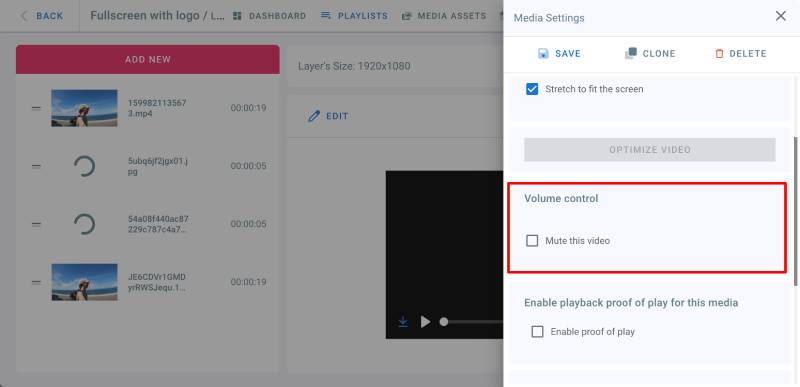
    The volume of a video or an IPTV channel can be controlled and muted in a playlist.


    Mute a video in a playlist
    Proof of Play

    • Go to playlists page and click on your playlist
    • Click on a layer
    • Click Edit on the video or IPTV stream you want to mute
    • In the Media Settings panel on the right, under Volume Control, check Mute this Video checkbox.
    • Click on Save

    (To unmute the video, uncheck the above checkbox.)

    08 - Channels 10 - Media Lifetime
      Digital Signage Support Guide